phpBB SEO Framework Pro is built for enterprise-grade performance, high-throughput search engine automation, and cryptographically verified commercial licensing. To deliver sub-millisecond URL rewriting, automated Google Search Console synchronization, instant IndexNow protocol dispatch, and deep on-page SEO content analysis, your web server must provide modern PHP features and standard compiled extensions.
This guide outlines the baseline hosting requirements, lists every mandatory and recommended PHP extension with its specific role, and provides quick instructions for enabling them in cPanel, DirectAdmin, and Linux servers.
★ AUTOMATIC IN-ACP HEALTH CHECK
You can inspect the real-time status of all required and recommended extensions directly from your administration panel at:
ACP » Extensions » SEO Pro » Overview » PHP Extensions & Server Environment
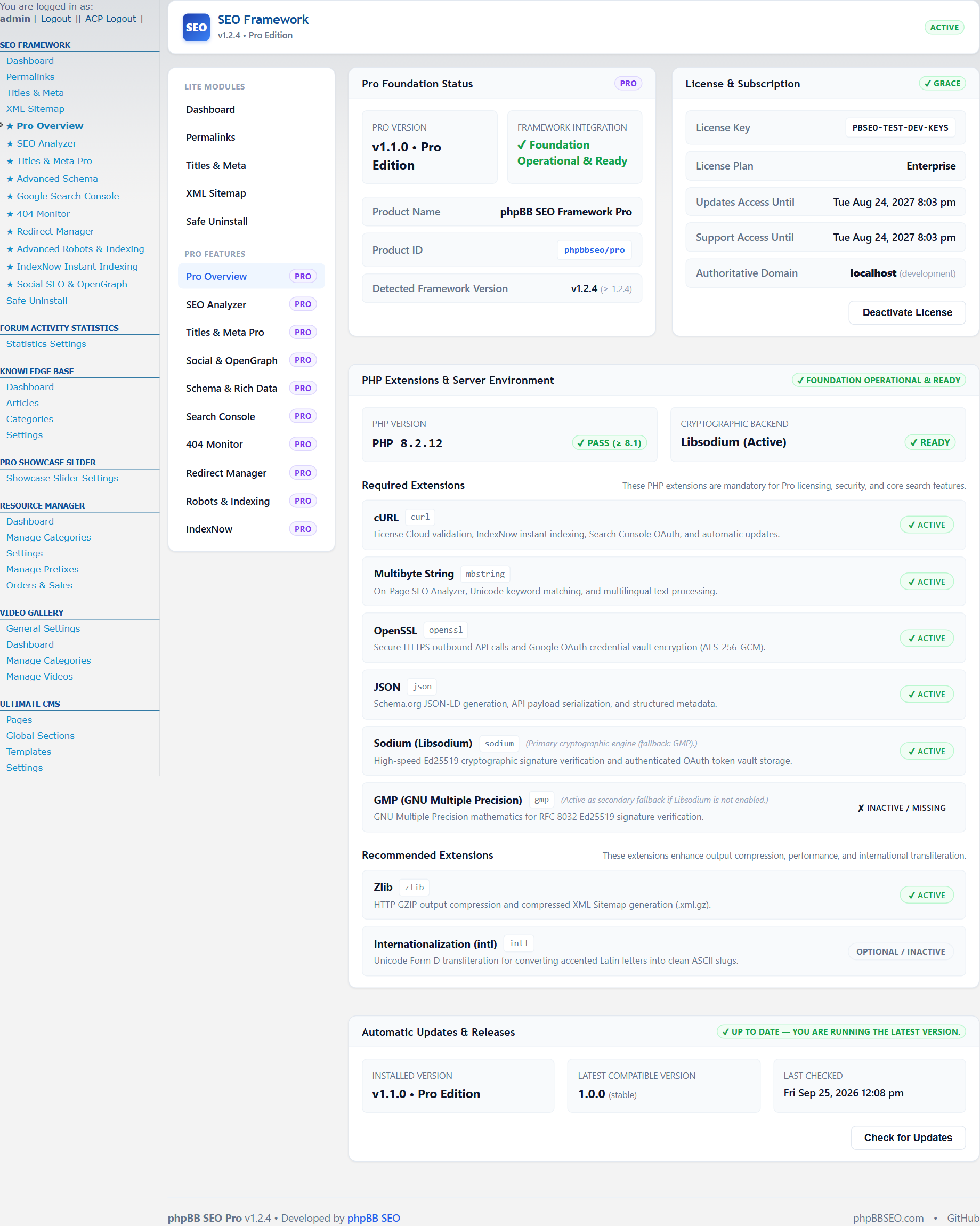
Figure: Real-Time PHP Extensions & Server Environment Verification in ACP
1. Baseline Server Environment
- PHP Version:
PHP 8.1.0or higher (fully tested and optimized forPHP 8.1,PHP 8.2, andPHP 8.3). - phpBB Version:
phpBB 3.3.0up tophpBB 3.3.14+. - Foundation Prerequisite: phpBB SEO Framework (Lite) version 1.2.0 or higher must be installed and enabled as the core foundation layer.
- Web Server: Apache 2.4+ (with
mod_rewrite), Nginx, LiteSpeed Web Server, or OpenLiteSpeed.
The following extensions are required for phpBB SEO Pro to function, validate license entitlements, and connect with external search engine APIs:
cURL (
ext-curl)
- Why It’s Required: Facilitates high-speed, secure outbound HTTP/HTTPS requests.
- Core Features Powered: Real-time cloud license activation and entitlement refreshes, instant search engine submission via the IndexNow protocol (Microsoft Bing, Yandex, Naver), Google Search Console OAuth 2.0 API queries, and 1-click update package downloads.
- Impact if Missing: The extension cannot activate or renew licenses, and search engine pings will fail.
ext-sodium) — Primary Cryptographic Engine
- Why It’s Required: Provides hardware-accelerated Ed25519 asymmetric digital signature verification (RFC 8032) and AEAD authenticated token storage.
- Core Features Powered: Verifies that commercial license payloads and entitlement tokens originate untampered from the official phpBB SEO Cloud Authority.
- Fallback Alternative: If Libsodium cannot be compiled on your server, phpBB SEO Pro includes a transparent mathematical fallback engine using GMP (see below).
ext-gmp) — Secondary Cryptographic Engine
- Why It’s Required: High-precision arbitrary-length integer arithmetic.
- Core Features Powered: Serves as the zero-dependency pure-math cryptographic backend for Ed25519 signature verification on hosts where Libsodium is unavailable or restricted.
- Note: Your server must have either
sodiumorgmpenabled. Having both is fully supported (Libsodium takes priority for maximum speed).
ext-mbstring)
- Why It’s Required: Unicode-compliant multi-byte character inspection and text encoding.
- Core Features Powered: Drives the On-Page SEO Quality Content Analyzer in the posting editor, calculating exact word frequencies, heading structures, reading ease scores, and keyword densities across Persian, Arabic, Cyrillic, Chinese, and Latin alphabets.
- Impact if Missing: SEO content score audits will fail to parse non-ASCII languages correctly.
ext-openssl)
- Why It’s Required: Cryptographic transport security and symmetric data encryption.
- Core Features Powered: Secures outbound HTTPS handshakes and encrypts Google OAuth 2.0 client secrets and refresh tokens in your database via AES-256-GCM.
ext-json)
- Why It’s Required: Serializing and deserializing JSON payloads.
- Core Features Powered: Generates Google-compliant DiscussionForumPosting and BreadcrumbList Schema.org structured data graphs, and parses search engine API responses.
ext-dom / php-xml)
- Why It’s Required: XML DOM tree traversal and document formatting.
- Core Features Powered: Essential for phpBB's core
s9e\TextFormatterengine (rendering BBCode and post previews) and dynamic XML sitemap processing.
While not strictly blocking, these extensions significantly enhance performance, URL cleanliness, and search engine crawl speed:
Zlib (
ext-zlib)
- Role: Output compression and archive extraction.
- Benefit: Allows phpBB SEO to generate compressed XML Sitemaps (
sitemap.xml.gz), reducing bandwidth consumption by up to 85% and speeding up Googlebot sitemap ingestion.
ext-intl)
- Role: Unicode Normalization (Form D).
- Benefit: Converts accented and diacritical European characters (such as é, à, ö, ü, š, č, ł) into clean, standard ASCII characters in URLs while fully preserving native RTL and Cyrillic scripts.
A. cPanel / DirectAdmin / Plesk (Shared & Managed Hosting)
Most commercial web hosts provide a graphical PHP selector:
- Log into your hosting control panel (e.g. cPanel or DirectAdmin).
- Navigate to Software » Select PHP Version (or PHP Selector).
- Ensure your current PHP version is set to 8.1, 8.2, or 8.3.
- Click on the Extensions tab.
- Locate and check the boxes for:
-
curl -
sodium(and/orgmp) -
mbstring -
openssl -
json -
dom/xml -
intl -
zlib
-
- The changes take effect immediately without needing to restart the server.
If you manage your own Linux VPS running Apache or Nginx with PHP-FPM, install the packages via
apt:
Code: Select all
# Update package repositories
sudo apt update

# Install extensions for PHP 8.2 (replace 8.2 with your active version)
sudo apt install -y php8.2-curl php8.2-sodium php8.2-gmp php8.2-mbstring \
                    php8.2-openssl php8.2-xml php8.2-intl php8.2-zip

# Restart PHP-FPM and Web Server
sudo systemctl restart php8.2-fpm
sudo systemctl restart nginx # or: sudo systemctl restart apache2
Using standard Remi or system repositories via
dnf:
Code: Select all
sudo dnf install -y php-curl php-sodium php-gmp php-mbstring \
                    php-openssl php-xml php-intl php-zlib
sudo systemctl restart php-fpm
★ UPGRADE YOUR COMMUNITY WITH ADVANCED SEO
Unlock DiscussionForumPosting Rich Snippets, automated Google Search Console monitoring, instant IndexNow submissions, and real-time content analysis with phpBB SEO Framework Pro.
Get phpBB SEO Pro License »