phpBB SEO Pro
PRO SUITE
1 / 9
Initial Release
v1.0.0
BBCode Permissions for phpBB 3.3
BBCode Permissions is a lightweight, secure, and modern phpBB extension that allows forum administrators to restrict the visibility of specific BBCodes (both built-in phpBB tags and custom forum BBCodes) from selected user groups (e.g. Guests, Newly Registered Users, or any custom group).
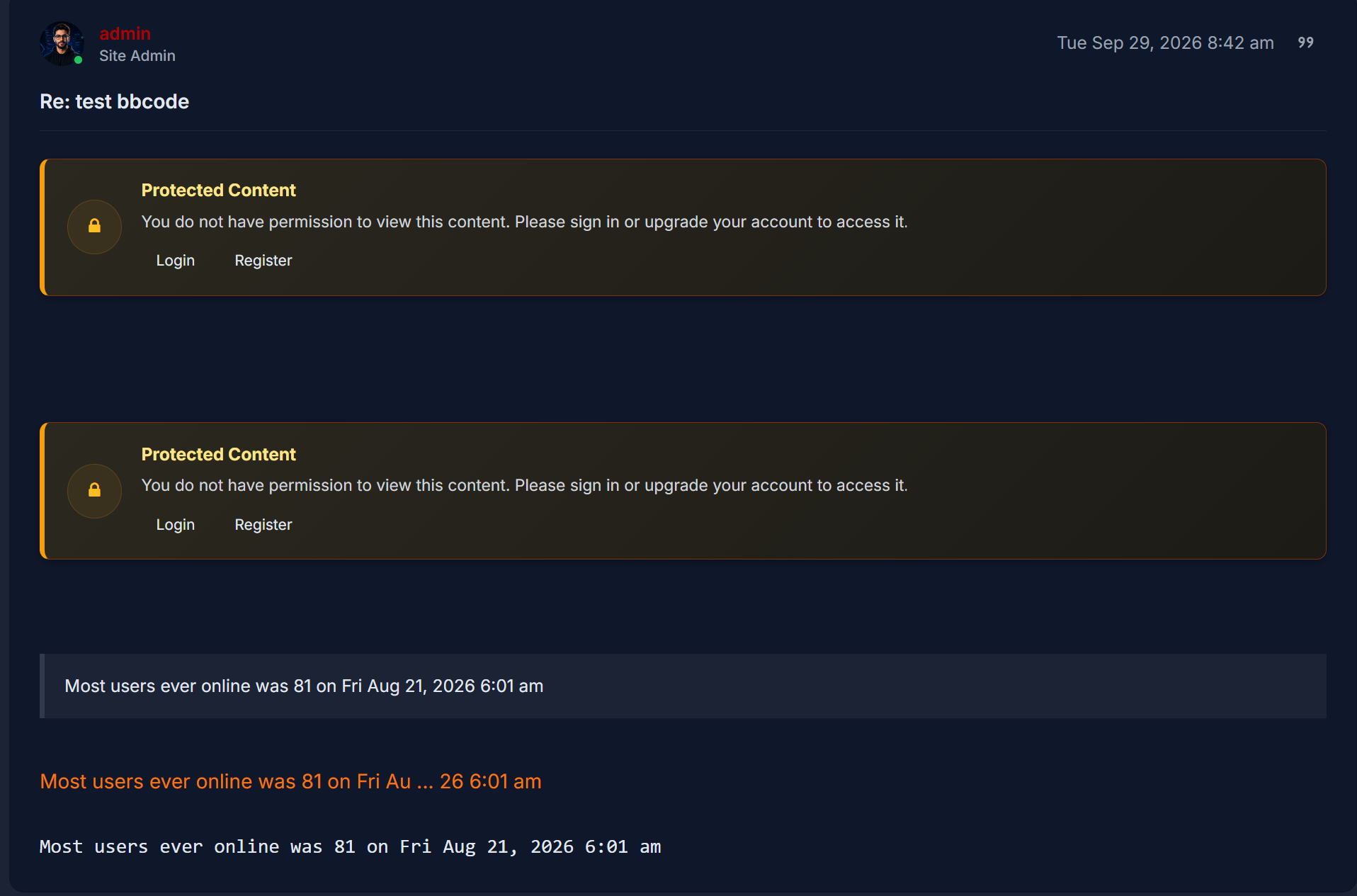
When a restricted user views a topic or post containing protected BBCodes, the hidden content is cleanly replaced by a customizable, responsive alert box containing your custom notice and dynamic action buttons.
Key Features
BBCode Permissions is a lightweight, secure, and modern phpBB extension that allows forum administrators to restrict the visibility of specific BBCodes (both built-in phpBB tags and custom forum BBCodes) from selected user groups (e.g. Guests, Newly Registered Users, or any custom group).
When a restricted user views a topic or post containing protected BBCodes, the hidden content is cleanly replaced by a customizable, responsive alert box containing your custom notice and dynamic action buttons.
Key Features
- Core & Custom BBCode Support: Restrict any default phpBB BBCode (
Code: Select all
, [quote], [url], [img], [attachment], etc.) or any custom BBCode created on your board.
[*] [b]Manual Extra Tags:[/b] Easily append comma-separated tags directly via the ACP for third-party extensions.
[*] [b]Flexible Group Checking Modes:[/b]
  [list]
  [*] [i]Any Group (Default):[/i] Content is hidden if the viewer is a member of any restricted group.
  [*] [i]Primary Group Only:[/i] Content is hidden only if the viewer's primary/default group is restricted.
  [/list]
[*] [b]Admin & Founder Bypass:[/b] Administrators and board founders can view all content without restriction.
[*] [b]Full Quote & Nested BBCode Protection:[/b] Automatically sanitizes content inside nested blocks and prevents unauthorized users from inspecting hidden text via quote/reply previews.
[*] [b]Modern ACP Interface:[/b]
  [list]
  [*] Filterable checklist boxes with real-time search.
  [*] One-click [b]Select All[/b] and [b]Deselect All[/b] controls.
  [*] Live selection counters.
  [*] [b]Live Message Preview:[/b] Instant real-time preview of your access denied alert as you type.
  [*] [b]Quick Insert Toolbar & Tags Table:[/b] Click any tag to insert it directly into your message template at the cursor position.
  [/list]
[*] [b]Full HTML Support:[/b] Design your access-denied alert with custom HTML, FontAwesome icons, and styled buttons.
[*] [b]Multi-language Ready:[/b] Includes complete English (en) and Persian (fa) translations.
[*] [b]Responsive & Theme Friendly:[/b] Works out-of-the-box with prosilver, dark themes, and RTL languages.
[/list]

[hr]

[b][size=130]Available Dynamic Placeholders[/size][/b]
You can use the following placeholders inside your Access Denied message:
[list]
[*] [b]{REGISTER_URL}[/b] – Direct URL to forum registration page (with session ID).
[*] [b]{LOGIN_URL}[/b] – Direct URL to forum login page.
[*] [b]{USERNAME}[/b] – Current viewer's username (or "Guest" if not signed in).
[*] [b]{SITENAME}[/b] – Board site name as configured in General Settings.
[*] [b]{TAG}[/b] – The name of the restricted BBCode tag (e.g. code, quote).
[/list]

[hr]

[b][size=130]Requirements[/size][/b]
[list]
[*] phpBB 3.3.0 or newer (tested up to 3.3.19)
[*] PHP 7.2 or newer (fully compatible with PHP 8.0, 8.1, 8.2, 8.3+)
[/list]

[hr]

[b][size=130]Installation[/size][/b]
[list=1]
[*] Download the release archive [c]phpbbseo_bbcodeperms_1.0.0.zip[/c].
[*] Unzip the package into the [c]ext/[/c] directory of your phpBB forum (resulting path must be [c]ext/phpbbseo/bbcodeperms/[/c]).
[*] Navigate to [b]ACP -> Customise -> Manage extensions[/b].
[*] Look for [b]phpBB SEO BBCode Permissions[/b] and click [b]Enable[/b].
[*] Configure permissions and alerts in [b]ACP -> Extensions -> BBCode Permissions[/b].
[/list]

[hr]

[b]License:[/b] GNU General Public License v2 (GPL-2.0)
[b]Homepage:[/b] [url=https://www.phpbbseo.com]https://www.phpbbseo.com[/url]





1 / 4